
Tag Archives: ipad

Weekly Photo Challenge: Wrong

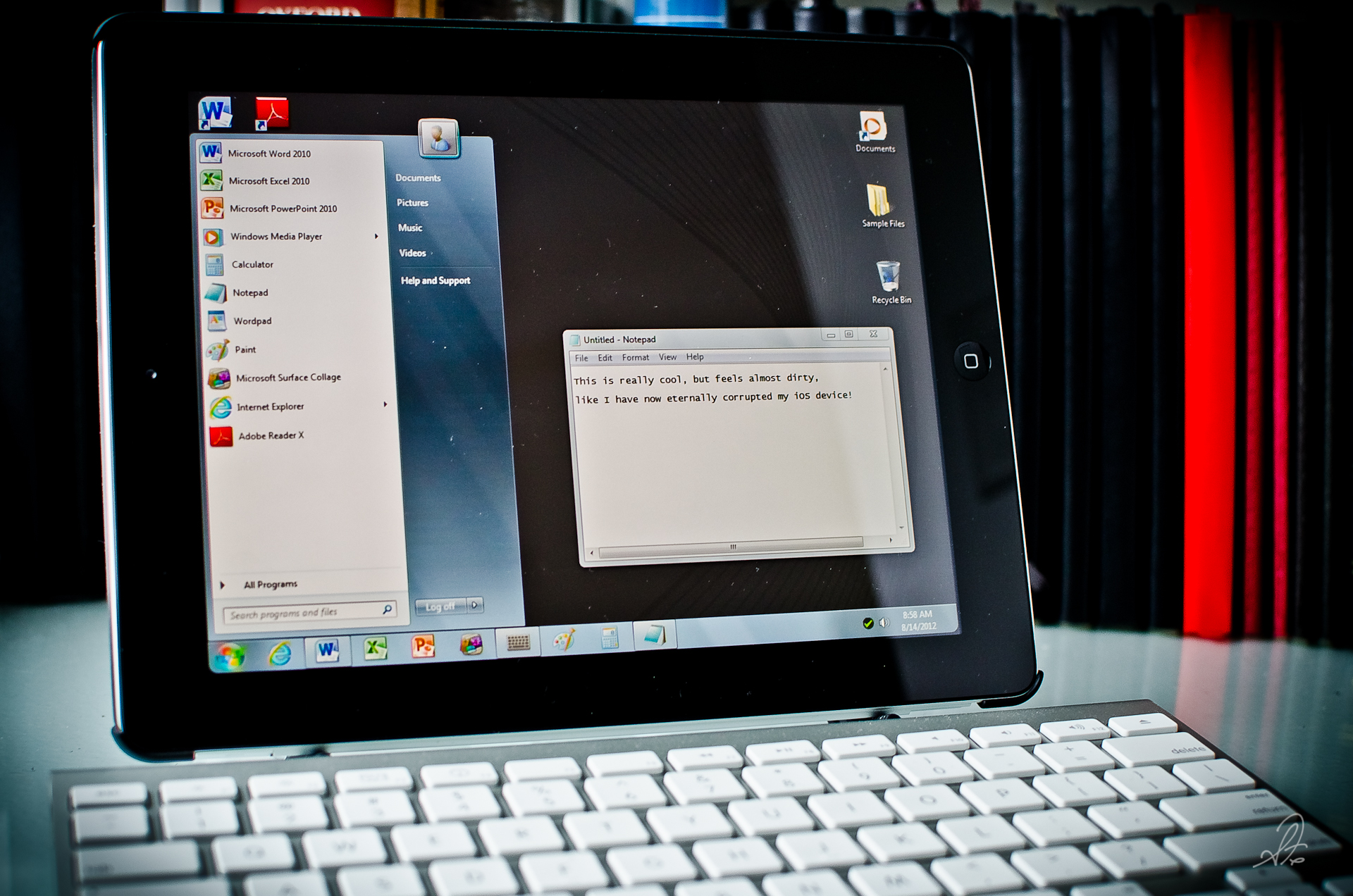
Running Windows 7 on an iPad iOS Device

This was another very difficult topic this week from the Weekly Photo Challenge over at WordPress, and I decided to completely forgo the theological “wrong” since I covered one of those last week, and besides that topic is just too enormous to narrow down for this post. Since I’m such a huge fan of semiotics (not to be confused with the nonexistent signology, or the non-theological Sinology), I thought this whole week I would post one of the many “wrong” signs I came across. There were so many possibilities, like the photo of what to do when you get locked in a restaurant bathroom, or the creative porta-potty business owners here in Auburn, but I thought those just too tacky for the sophistication of this series.

If you are wondering why I’m even doing this Daily Post series called the Weekly Photo Challenge (which is actually part of the larger WordPress series called the Post a Day series), it is because it makes me think outside the box, and that helps me with almost everything I do. When doing some photographic research for an artistic interpretation of “wrong” you get some really weird stuff, like this not-so-innocent looking cat. That really makes a true photographic interpretation of wrong open to almost anything the heart desires, emulating our world today I might add.

In keeping with my desire to photograph something unique amongst all the other posts I tried to figure out what the stereotype photo of what “wrong” would be, and I have concluded there isn’t one. So instead, I chose the ultimate wrong of our technology culture today by using my iPad as an example, but it’s more like a Where’s Waldo wrong than a smack you in the face wrong.

It’s probably overly obvious to some, but I’m sure not to all. Anyone… ?

Related Posts of Wrong

  1. Weekly Photo Challenge: Wrong | Nature in the Burbs
  2. Weekly Photo Challenge: Wrong « I am Perfectly Imperfect
  3. Weekly Photo Challenge- Wrong « Carol Loethen
  4. Weekly Photo Challenge: Wrong | Carltonaut
  5. Weekly Photo Challenge: Wrong | The Daily Post at WordPress.com | Scion Players

Weekly Photo Challenge: Inside, a MacBook 5,1

Project 365 [Day 239] Inside Look at the Mother Board of a MacBook 5,1

Project 365 [Day 239] Inside Look at the Mother Board of a MacBook 5,1

This post serves a few different purposes, like Day 239 of my Project 365, but once in a while I like to get something up there for the WordPress Weekly Photo Challenge, and since this week’s theme was inside, I thought this would make a great shot. I don’t spend all of my days inside one of these, but at least some part of each week is spent messing around on the inside of one of these machines. This one is the first generation aluminum MacBook 5,1 (before the MBP version). This is the entire mother board here, RAM at the top and most of the guts on the flip side of the circuit board. The MacBook5,1 as it is known was one of the first unibody frames, and made a great laptop for several years, and in the very center of this mother board you can see the words “Apple ©2008.” Things move fast in the world of laptops and tablets, and this machine is now almost a relic of its day, now designated as a “streaming machine” for videos.

I was trying to think back at how many laptops and desktop computers I have had over the past 20 years (including an actual IBM 5150 from the 1980′s), but there is just no way in the world to know. My first computers weren’t Gateway or Dell, but were hand built IBM machines where I picked out each RAM chip, video card, modem, the CPU chip and so on, each separately. Wow those were the days

You can get a lot of life out of old machines for secondary purposes, and sites like iFixit with their step by step teardown of almost every single Mac ever made is a great place for do easy repairs, even iFixit on this old MacBook5,1. More and more these once great laptops are being replaced by better and better tablets, like the iPad, and Nexus 7, I already wonder how we ever lugged around such a massive device.

Google Drive vs Dropbox, Amazon, or Microsoft Sky Drive for Cloud Storage?

Google Drive Storage

There was some great news from Google this week concerning cloud storage, and while it isn’t up to what I want in replacing your hard drive, Google Drive is a great step forward in drive cloud storage with 5GB free, and apparently I’m grandfathered in to my 20GB $5/year plan (see screenshot below). Finally Google put some effort into developing something we can truly use instead of trying to beat Facebook or Twitter at social networking. Eventually, this type of storage is going to do away with our need to keep purchasing more and more hard drives to store our files with only a small flash drive needed on the system for the OS. I have almost 8TB’s of data stored on local hard drives at this point, so this lousy 5GB of storage won’t help that, but it’s a start.

If you aren’t familiar with using cloud storage, until now, there was really only one real option, and that was Dropbox. Yes there are those like Box.com and Amazon Cloud Drive (provide 5 GB), and Microsoft’s SkyDrive (offers 25 GB) who just made some nice improvements this week, probably in anticipation of the release of Google Drive. Each of those have some significant disadvantages, and I don’t ever really consider them to be viable options because of their limitations or issues. Apple’s iCloud is great for backing up devices, but it doesn’t even offer an option for drive storage in the cloud. While I love Dropbox, the basic computer user still isn’t really familiar with Dropbox, and they are with Google. That doesn’t make Google better than Dropbox, but it does make Google Drive easier to integrate with your friends or family to share files. So which one is better, Google Drive or Dropbox? There services seem to be almost identical, but Google has some significant advantages over Dropbox.

Google Drive Storage 20GB $5 year

The biggest news, at least to me, about the Google Drive launch in the fact that they are going to allow you to keep up to 100GB of data stored for a reasonable price of $5.99, it’s just too bad once you get above that, it’s outrageous, but that too will change. This is great on multiple levels, and something probably only Google could do with some massive data centers that companies like Dropbox, and perhaps even Microsoft, just don’t have. When you are looking at possible server farm potential for cloud storage, the biggest possibilities right now are Google, Amazon, and of course Apple who just built a massive cloud server farm in North Carolina, which is even visible from space now. All of this is good for those who want all files stored in the cloud instead of on local home hard drives that fail.

Advantages and Disadvantages in Google Drive vs Dropbox

  • More storage – 5GB of Storage on Google compared to 2GB on Dropbox (you can gain more on Dropbox)
  • Blanket Existing Coverage  - most of us already use Google for just about everything from email to Internet searches
  • Google Recognition – sometimes this is negative, but in this case, everyone has heard of Google, tech-nerds know Dropbox
  • Integration and Development in OS – both have ability to run within MAC OS-X or Windows but Google has greater development potential. The biggest plus here is with Google Docs and other Google products.
  • Automatic Syncing – both have this as well, that’s the point of cloud storage
  • Works with iOS and Android – both have this too (Google Drive says coming soon on iOS), but the Dropbox versions could use some better features, hopefully Google will do this
  • Backup – this is a big question for me, what happens with my account and my files if the company goes Chapter 11. Google has less chance to do this.
  • Potential Increases in Storage – Google is known for increasing storage size constantly, and to me, the more storage the better
  • Integration with Google Apps – Not sure how soon this is on their radar, but at work we use a Google App account
  • No URL Links – Dropbox just released this feature this week, a feature that lets you have a unique URL for each file. I see no mention about this in the Google Drive information but it has to be in the works, they couldn’t have just overlooked this feature. For now, I only see this available on Dropbox.

For now we all have to wait until Google actually rolls it out instead of just giving us the information, and of course, they developed the Android OS before the iOS, so us Apple iPhone and iPad users will have to wait even longer. Still, it’s a step in the right cloud storage direction!

Spring Rains Across the South Today :: Friday Feet

Friday Feet Photo of the Day

Today was one of those rainy days that every time I tried to get out and get something done, it poured. I ended up cutting a few acres of grass, getting soaked in the process, then trying to finish my current book (How to Read the Bible for All Its Worth), but such is the way the weather goes in the Spring in the south. That’s better than not getting any rain at all, which has been the case over the past several years with our drought. Today my iPad and a rainy screened in patio will serve for a long overdue Friday Feet Photo of the Day.

Reflections on the Grey Days of Fall in the South :: Friday Feet

We can’t seem to escape from these cloudy grey days down here, but it could be far worse, we could be somewhere farther north where it’s got to be colder. My Friday Feet today came from an impromptu photowalk around my the block, so to speak. I was taking a very needed break from writing one of three research papers that are due by next Friday.

One of the subjects of photography I have always loved to look for are reflections. Reflections are one of the more rarely photographed views basically because you have to search them out, and then try to make the subject useable. Reflections are everywhere, and they look great when they show up naturally. We have a small pond in the back of our place that has very little water in it right now, and consequently, it’s very black and still.

As I walked around the property I found a great combination, and created the shot below of me with my iPhone. There isn’t any special filters or photoshopping done to the image below, just a little boost to the contrast to bring out the leaves (see exif metadata here). The reflection of myself comes from the water, just like the trees above my head. The color and texture comes from the leaves sitting on the mud bottom of the pond, so the shot is both translucent, and reflective. The shot just below of me holding my iPhone out over the pond is my P365.me :2012 (Project 365) image today for Day 11. All shots in this post were taken on my iPhone. Have a great weekend everyone.

Religion Better Understood by Actions Than by Words

I have been trying for weeks to figure out what to take and what not to take with me to Uganda, and as a friend of mine said yesterday, less is more. It seems no matter how little I take I’m still doing what I perceive a typical American would do, take too much stuff. So books are my big question mark left. I have several (actually more than several) books that I have been trying to read over the last several years and I would love to take them all with me and finish them on the first plane flight but can’t decide if I will actually read them. Three of these books at top on my list, God’s Passion for His Glory: Living the Vision of Jonathan Edwards with the Complete Text of The End for Which God Created the World (yes I know, the title is very long) by John Piper and Jonathan Edwards, The Life and Diary of David Brainerd by David Brainerd and Jonathan Edwards, and The Life of God in the Soul of Man by Henry Scougal. I have picked up and read all three, then put down, then picked up again, and so on… for years now.

I know these aren’t your traditional quick reads, and one is quite a bit beyond my comprehension. I have all of them in Kindle eBook for my iPad, paperback, and audiobook but keep going back to the paper bound books because of the depth of their words. This morning I was going through each of these three books thinking about my time in Uganda, our sponsor child, Joanita, who I hope to meet while I’m there, I came across this chapter in The Life of God in the Soul of Man, titled “Religion Better Understood by Actions than Words”. After re-reading that chapter I wanted to share Scougal’s words here today that help remind me why we go. The text is also available in Google Books here.

Religion Better Understood by Actions than by Words

When we have said all that we can, the secret mysteries of a new nature and divine life can never be sufficiently expressed; language and words cannot reach them: nor can they be truly understood but by those that are enkindled within, and awakened unto the sense and relish of spiritual things. There is a spirit in man, and the inspiration of the Almighty giveth him understanding.

The power and life of religion may be better expressed in actions than in words’ because actions are more lively things, and do better represent the inward principle whence they proceed; and therefore we may take the best measure of those gracious endowments from the deportment of those in whom they reside; especially as they are perfectly exemplified in the holy life of our blessed Savior; a main part of whose business in this world, was, to teach by his practice what he did require of others, and to make his own conversation an exact resemblance of those unparalleled rules which he prescribed: so that if ever true goodness was visible to mortal eyes, it was then when his presence did beautify and illustrate this lower world.

I know that is kind of a mouth full for only two sentences, and not in the most current English, but Scougal’s words here are pretty incredible. That’s why this book has taken me so long to read. The words are incredible but I have to read each page several times. Once you do, the value is deep and lasting. Why do we go according to Scougal? Because this is what Jesus did and He is our ultimate example to follow. As Scougal says, our actions are better represented by the inward principle they represent. This is to say our actions proceed from where our heart resides, and to me, that’s very telling, and a little scary.

Reasons Why Google+ is Already Better than Facebook

So I almost felt obligated at this point to do a post about Google+ just because it really wasn’t what I was expecting from Google. What I was expecting from Google was another failed attempt at doing something social (they do have a good long history of trying social networking and missing big time), but this time I think they created something that just might work long term. Of course, it works, because basically they finally developed a format stream that is just like Facebook except without much of the garbage that is Facebook. When (not if) Google adds an iPhone AND an iPad app they will have surpassed Facebook, at least in functionality.

When Zuckerberg made the statement that the iPad was not a mobile device, and therefore Facebook would not be developing an app for the iPad, he pretty much told everyone using Facebook that Facebook is whatever Zuckerberg says it is. Google, even though they seem to have the biggest rival with Apple, can no doubt see beyond this and will very quickly release apps for the iPhone and iPad. Once Google+ hits the iPhone/iPad users they will grow at an alarming rate. It’s the “mobile” users that will feed Google+ and the easier Google makes it to use on ANY mobile device the faster they will grow Google+. The misses right now with Google+ remain the lack of an iPhone app and some other minor functionality issues like being able to hide comments in a stream, being able to view several circle streams at the same time, and at the moment people. The people thing is a plus and a minus at the same time. The millions and millions of masses on Facebook are what makes Facebook work. Google+ has a different genre of people right now and I don’t see that as a bad thing, but they do need more buy in.

Why is Google+ better than Facebook already?

  • No Ads
    so far (who knows how long this will last) there are no ads, anywhere. This is top on my list, and key. This is why I like twitter, this is why the experience on Google+ is better right from the start. All that junk on Facebook’s sidebars is the worst. You never know what’s going to come up but you know you don’t want to look at it.
  • No Spam
    Facebook and spam go together like spam in a can, or something like that. Spam is not the telemarketer calling you at dinner anymore. Spam is ANYTHING sent to you unsolicited. Facebook is full of this stuff from Mafia Wars to stupid games and poll questions, event invites, and all the other stuff that clutters up your feed stream with stuff you don’t want to look at. The stuff you do want to read is so buried in the mess of Facebook I often just give up trying to find actual real high quality content.
  • Design is Cleaner
    everything is cleaner, but making a cleaner design makes it easier to read, has less clutter, call it whatever you want but Google+ is just flat out easier on the eyes. Google has long since prided itself on simplicity of design, and in this case it works so much better than Facebook
  • Messaging System
    while Facebook has been vastly improving their messaging system, trying to overtake email, the message system on Facebook has always been one of their weakest points, and until recently, no one wanted to look at that inbox, it was just annoying. Google+ has made sending a message to a single person, or a select group, extremely easy. I would expect this since Google has built it’s non-search business around Gmail, but Google+ has the potential to be able to do away with email all together.
  • Integrates with Google Everything
    this is a no-brainer but it’s worth pointing out. There are some things I like better off Google, like their photo system Picasa (Flickr still has better functionality) but overall everything you do throughout the day is basically run on Google’s cloud anyway, you are already there, so adding Google+ isn’t too much of a burden.
  • People Who Don’t Like Social Networking Will Like Google+
    there are still some people that are not attached to a social network at all (really, I know this for a fact). For those people, Google+ is a way into that social networking circle without being in Facebook or Twitter. For many (or most) of these people they are already on Google. They use Google, they use Gmail, they are familiar with Google and in some ways have a trust built with them as a company. If you aren’t on Facebook or Twitter or anything else, you are probably already on Google, and Google will make trying Google+ a breeze for the non-adopters.
  • It isn’t Facebook
    there are many people who just hate Facebook, for them, this isn’t Facebook and that is good enough for them.
  • It is Google
    this is just like the Apple vs Android thing. Some people think Apple is straight from the devil himself and think Android is not. Facebook has a lot of “you are the devil” fans so being anything but Facebook is a plus.
  • It’s New and Has a Lot of Potential
    everyone doesn’t necessarily like change but new is always a big seller. Since every company puts out products or services today that are a work in progress (beta) and not a final completed entity, Google will continue to develop and improve Google+. Yes I know Facebook does this too, but they seem to take 2 steps forward and one step back and make everyone mad in the process.
  • Facebook still Doesn’t Give you Ownership of Your Data
    some will say Google doesn’t either, but they have made far more progress in this realm than Facebook has, and Facebook has no intention of ever letting go of your data. Every time you put content on Facebook instead of your own blog or somewhere that you have access to your own data you are building up the mother ship, not your own history. Google+ has a really cool download data set functionality that will probably improve over time. Facebook has nothing. Facebook owns everything you put on there and you own nothing.
So there you have it. I am sure there are plenty of other points I could make but those are my first and initial observations after using Google+ for about a week now. What has your Google+ experience been so far? If you need an invite just send me an email and I will send one over.

Printed Books vs iPad or Kindle eBooks and the Future of Books

I love having this conversation with my paper book loving friends, maybe because I am always in the minority when it comes to eBooks over paper books with the IRL friends. Even if you don’t read my post below, go read this comical view of the debate from TheNextWeb called Product Review: Will ‘Paper’ Replace E-Readers?. This is a great look at the debate, which is sure to rage on for years, but digital is gaining ground every day. Amazon even announced last year that Kindle eBooks started outselling paper books, but that’s old news now (see also What Amazon Didn’t Say About eBooks by CNET). I even wrote this: Amazon Kindle 2 iPhone App and the Future of Books? almost two years ago now when the Kindle 2 came out, it’s interesting to see how eBooks have changed since that post.

I do think that the physical paper printing of books will always be with us as long as we have trees left to use. There is value in each platform, but it is hard to deny the future of books is in a digital form, just like analog LP’s made way for MP3′s. There are many today who still swear by vinyl records, saying the sound quality surpasses a Compact Disc (which from what I understand, it does), but LP’s are now a niche in the digital world of music.

The history of an LP is far far less in time than the historical life span of the printed book by some two thousand years or so, so it may take a long long time before we see paper books reduced to the level of vinyl records. Good or bad though, it seems inevitable at some future date that eBooks will far outsell and be the preferred platform to read a book. This two lists below is an extremely small snapshot, it could easily have been a list of 20 plus, but for sake of being long-winded, here are a few.

The Pros About eBook and eReaders

  1. Price :: It’s almost always cheaper
  2. It is almost always the case that eBooks are cheaper than paper copies, sometimes drastically cheaper. This is just the realities of the manufacturing process. Paper is expensive, uses natural resources, and you are taking a digital original (I am guessing no author writes by hand, but all use a computer to write) making it into paper. An eBook you don’t have that conversion.

    There are still publishers that just don’t get it, or are overly greedy. I would love to see one give a side by side comparison of profit margins for an eBook over a paper copy that has to make its way into the distribution network. An eBook is overwhelmingly cheaper to produce and distribute than a paper copy, so “most” publishers pass that savings along to their customers. If the eBook is close to the same price, it shouldn’t be. DRM is always trying to rear its ugly head as well.

  3. Weight :: No matter how many books, they all weigh the same
  4. I can carry 10 books, or 100 books on my iPad 2 and their combined weight is still going to be 1.33 pounds (601 g). This is a bigger deal, at least to me, than it sounds. If I am going on a trip, especially on a plane, I can literally take as many books as I can possibly read, that just isn’t physically possible with paper.

  5. Features :: instant searching, highlights, bookmarks, notes, and more
  6. This in an incredible feature of owning an eBook. You have instant access to search all aspects of the book, your notes, highlights, and you even have instant access to a dictionary, Wikipedia search, or even a google search on a selected area (try searching the bible for one single word or phrase by paper). Amazon takes this one step farther and offers all highlights, notes, and bookmarks for each book on your Amazon account at http://kindle.amazon.com/. From there you can access everything associated with each kindle book.

The Pros About Paper Books

  1. The Physical Smell and Feel of Paper?
  2. This seems to be the biggest hang up with those who love paper books, you can’t get that musty smell of the paper and ink with an iPad. I know this smell well. Deb and I owned our own book business for several years (see We are No Longer Selling Books as Amazon Marketplace Sellers) and we had a house filled to the brim with tens of thousands of books. It is a smell that lingers with you for a long time. Personally, I love the smell of solder and computer boards in the morning, but it’s true, you don’t get that connection with nature without the paper.

  3. Paper is Art :: it is created only when reading is complete
  4. I understand this one too, but I would think a hand written copy by a scribe would be more art than a bulk made printing press, but yes, you the reader make the book into art as you read the book. If you highlight, underline, scribble, you are free range on the book and when the book is finished, you have a new “work of art” unlike anyone else. Of course if you are one who never highlights or makes notes (and if you are, I don’t get that either), then the book is not art, but just the same book that still sits on a Barnes & Noble shelf.

  5. Comfort Factor
  6. For some it’s just the comfort, like that of an old slipper. A book, by definition, is paper. If it’s digital, call it an eBook, not a book. Some say it just isn’t the same to curl up with your iPad eBook in front of a warm fire and drift off into the greater beyond of reading. I will say on this point that there is a distraction factor with a digital device that is totally removed by a paper book. Your paper book won’t pop up with a Tweet  or news alert while you are in the middle of a deep chapter, and this adds to the comfort level.

Processing Life in a Digital Age of iPads and Tablets :: Friday Feet

I remember when we use to marvel at the power we had at the tip of our fingers on those big clunky desktop computers. You always use to hear things like this computer is more powerful than the one that was used to launch the Apollo rockets, and it was, but today, in the world of tablets (Android or iPad), it truly is amazing how much power we have at our fingertips. Combine an iPad with a wireless bluetooth keyboard and you have something that is mightier than both the sword and the pen.

I understand, realize, and recognize, this isn’t for everyone. I know some don’t even have Internet access and don’t miss it, which is perfectly fine. Those who have chosen to use the technology that comes with being alive in 2011 know that what you are starting to be able to do with tablets is amazing. The lines between being tied to even a laptop have diminished with every passing month, and I equate it to what it must have been like when the car was invented and suddenly people could travel far greater distances than they ever could before.

This is not an Apple thing or an Android thing, this is a means to communicate, to reach and connect with other people, and in many cases a means to change the world. Some may think that is a stretch, so, ok, today, it is a means to read Paul’s words in the book of Acts, and my Friday Feet.

Top 10 Best Apps for the iPhone or iPad iOS 4.3

Since the new iPad2 and the Apple iOS 4.3 was released last week I have had several people at church ask what “Christian” apps I would recommend for their iPad or iPhone, and I finally just decided to do a blog post about it. Since there really was only one app I would call a “Christian” app that applies to a lot of people that I would highly recommend (YouVersion), I have included an overall top ten I would recommend for people just starting to use an iPad or iPhone instead.

This list can easily apply to anyone wanting to get a lot of good use out of their new iPad, I say that above only to show that this app list is from a Christian perspective on currently available apps and I would consider all of these safe to download, and would also provide some productive value in your daily use of these two devices.

If you are new to the iPad or iPhone App Store then these might be a good place to start. For those who have been around the iPad for a while now these may seem old news, but I still like to evaluate the apps I use periodically to determine if they are still worth keeping. Most of these below I have used now for more than a year. I tend to find a good app and stick with it while the developers continue to improve it’s performance and features.

I will have an in depth review of a few of the apps listed below in upcoming blog posts, it was just too long to list right here. In the mean time, here is the brief overview of each of the top 10, plus four extras that almost made the cut:

Top Ten Best iPad / iPhone Apps

  1. YouVersion – Bible app
  2. Rating, 9/10 :: Best bible app available, period. It’s free, has tons of translations and is constantly updated. Most heavily developed app (possibly ever), has both iPad and iPhone formatted versions, and you can download some translations for offline reading. Access to live events, post to Twitter, Facebook, SMS, and email, loaded with features and still be developed. The best of the best. Price, free. (app info)

  3. Official Twitter app – Social Networking
  4. Rating, 8/10 :: If you are on twitter this is the first (but not only) app to have. Price, free. (app info)

  5. Facebook – Social Networking
  6. Rating, 4/10 :: Still included because of it’s siginificance but no official iPad app available, only iPhone app, which is awesome. Still, you can bookmark the Safari homepage but surely Zuck is working on an iPad exclusive app for Facebook. After almost a year, we still only have impostors available. (app info)

  7. MaxJournal – Journaling or Diary
  8. Rating, 6/10 :: Best journaling app available for iPad (no iPhone) but has room for improvement. If you’re not a big fan of MaxJournal, try iJournal for $4.99 with a higher rating but has less features. MaxJournal has far more features and options like fonts, import-export abilities (though somewhat limited), and the ability to create multiple journals. Price, $3.99 (app info)

    UPDATE: According to the developer they are possibly handing off this app to someone else, best to keep an eye on development if you are a heavy users of this app. Hopefully they will work it out. Another option (a few here too) is to use MacJournal from Mariner, which has a long running desktop app to sync with. They then added an iPad/iPhone app, so it’s not just a mobile app developed, it’s full fledged. The reviews are all over the map but I have used MacJournal Desktop app for years and love it.

  9. Amazon’s Kindle app – eBook Reader
  10. Rating, 8/10 :: Best eBook app reader, recommended over iBooks, Nook, and several others. I picked Amazon’s Kindle app over all the others for 3 reasons; (1) total books available, (2) price of available books, and (3) features. In depth review coming soon. Another GREAT feature of Amazon’s Kindle app is that you can access your highlights and bookmarks via the cloud at https://kindle.amazon.com/, that alone got me to switch from iBooks. Price, free. (app info)

  11. The Daily – Daily News and Current Events
  12. Rating, 8/10 :: New to the app store but has great content, always updated, highly interactive. This is the future of newspapers or online news in general. Complete review available, see Pros and Cons of The Daily app for iPad. Price $9.99/Mth or $40/year (app info)

  13. USA Today – Daily News and Current Events
  14. Rating, 9/10 :: Best overall rounded source for news with a dedicated app for the iPad. Not as feature or design rich as The Daily but more in depth news and constantly updated. Price, free. (app info)

  15. Pandora – Music
  16. Rating, 9/10 :: Best music streaming app available, at least until Spotify can get out of the UK and over to us here in the United States. If you like music I would highly recommend the paid version at $35/year, you get commercial free music with higher bit rates. Price, free. (app info)

  17. Evernote – Notes/Archiving of All Kinds
  18. Rating, 8/10 :: Best app for saving and archiving notes of all kinds, syncs across all platforms including a desktop app. This is the archival app, scan, scrape, email, text right into a cloud based note program that integrates with a host of other apps and programs. They offer a free service but once again I recommend the premium version of their service (app is free) as they give you much more for a small price. Price, free. (app info)

  19. Netflix – Movies
  20. Rating, 7/10 :: Online steaming movie app for both iPhone and iPad. Title selection needs improvement but it’s getting better every month. Most new releases are delayed and not all titles are available for streaming, some you still have to get the DVD mailed to you. Netflix has led the way in movie streaming and I suspect delays in titles or other issues like that are not their doing but the movie industry. Price, app is free but service will cost $7.99 per month. (app info)

Other Apps That Almost Made the Cut